
ECU Coding and Programming - What Is the Difference?
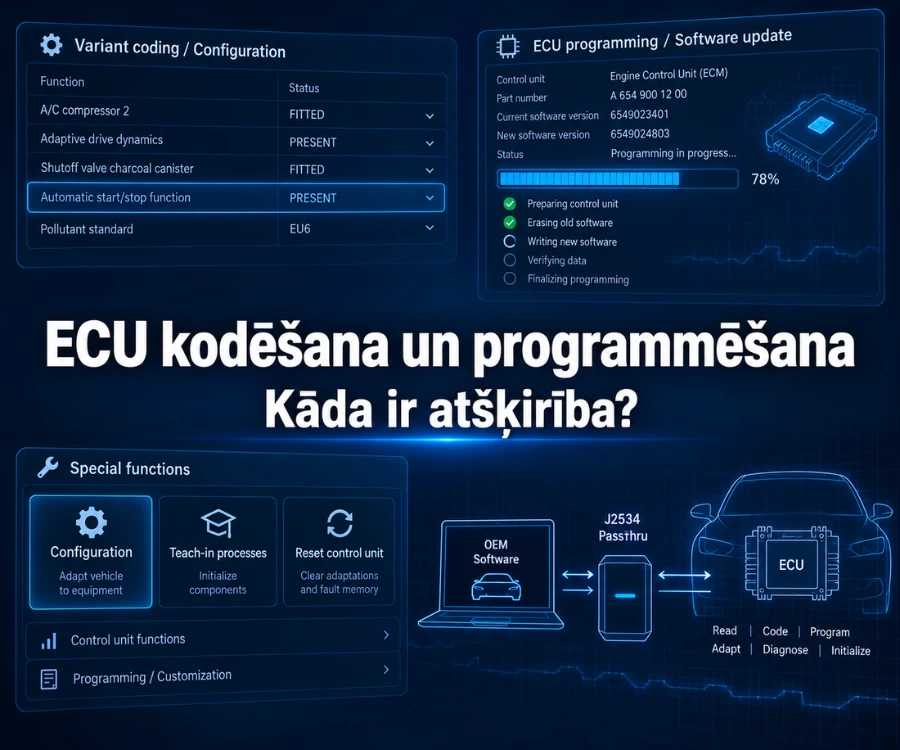
Diagnostic tool descriptions often include terms such as ECU Coding, ECU Programming, Adaptation and Relearn. At first glance, they may seem similar because all of these functions are related to a vehicle's electronic control systems. However, they do not describe the same operation.
ECU Coding is generally associated with configuring a control unit or adjusting specific parameters. ECU Programming, or reprogramming, usually means writing or updating software in a control unit. Adaptation and Relearn cover various adjustment, calibration and relearning procedures.
The terminology is not fully standardised. Vehicle manufacturers and diagnostic-tool manufacturers do not always use these terms in exactly the same way. A procedure listed under Coding in one diagnostic system may appear as Adaptation, Teach-in, Initialization or Basic Settings in another.
In short: ECU Coding usually changes configuration or parameters, while ECU Programming writes or updates control-unit software. Adaptation and Relearn cover additional adjustment or learning procedures. The exact terminology can vary by vehicle manufacturer and diagnostic platform.
In this article, we explain the difference between ECU Coding and Programming, where Adaptation and Relearn fit into the process, what J2534 Pass-Thru means, and what should be checked before using these functions.
ECU Coding, Programming, Adaptation and Relearn at a glance
The simplest way to understand the difference between these terms is to look not only at the name shown in the diagnostic-tool menu, but at what is actually changed or adjusted in the vehicle during the procedure.
| Function | What it usually does | Typical use case |
|---|---|---|
| ECU Coding | Changes or adjusts control-unit configuration | Configuring a control unit for a particular vehicle or equipment variant |
| ECU Programming / Reprogramming | Writes or updates control-unit software | Software update or a manufacturer-defined module programming procedure |
| Adaptation | Performs adjustment, configuration or calibration of a specific system or component | A procedure after certain repairs or component replacement |
| Relearn | Performs a relearning procedure for a specific system | Re-establishing or relearning information required for system operation |
This table is useful as a starting point, but it should not be treated as a universal standard used by every vehicle manufacturer.
For example, AUTEL user documentation also describes Coding as a Teach-in Program or Component Adaptation, and such procedures may be used after repairs or parts replacement. This shows that, in practice, Coding can overlap with what the table above describes as Adaptation. Reprogramming, on the other hand, is a separate procedure for writing or updating ECU software.
This distinction matters in practice: if ECU Coding is listed in a diagnostic tool's specifications, it does not automatically mean that the tool can perform every coding, adaptation or programming procedure.
What is ECU Coding?
ECU Coding is generally used to adapt the configuration of a control unit to a specific vehicle, its equipment or system requirements.
This process usually does not involve replacing the control unit's software. Instead, configuration data or parameters are changed to define how the control unit should operate in that particular vehicle.
This matters because the same or similar electronic control units can be used across several versions of a manufacturer's vehicles with different equipment and functions.
What can Coding change in a control unit?
Depending on the vehicle, a Coding procedure may involve:
- configuring a control unit according to the vehicle's equipment;
- adapting a new or replacement control unit to the vehicle;
- configuring certain equipment functions;
- setting individual system parameters or variants;
- making manufacturer-defined configuration changes.
This means ECU Coding should not be explained only as activating hidden functions.
On some vehicles, Coding can indeed be used to change certain comfort or equipment settings, but in professional diagnostics it is a broader concept and may also form part of a repair or electronic component replacement procedure.
Coding is also not the same as Active Test. During an Active Test, the diagnostic tool sends a command to the control unit, for example to switch on a fan or activate another actuator, in order to check the system response. Coding changes or adjusts the control-unit configuration.
For more on this distinction, see the BalticDiag article Live Data and Active Test in Vehicle Diagnostics.
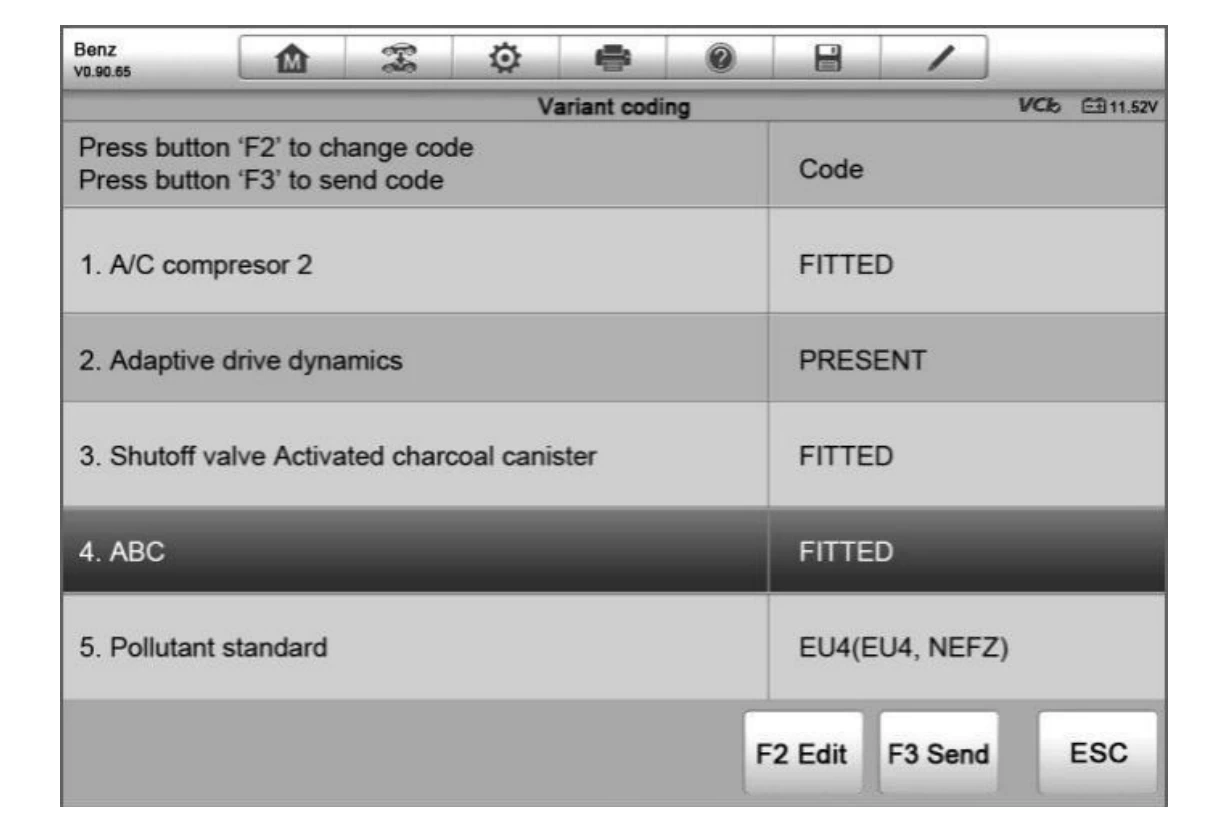
Why can Coding refer to different procedures in different diagnostic systems?
One of the main sources of confusion is that different vehicle manufacturers and diagnostic platforms do not group functions in the same way.
One diagnostic system may use the term Coding, while a similar procedure in another system may appear under Variant Coding, Configuration, Adaptation, Teach-in, Basic Settings or another manufacturer-specific name.
For example, AUTEL documentation also refers to certain Coding operations as Teach-in Program or Component Adaptation. In other menus, component adaptation and variant-coding functions may appear under Special Function.
Before using a Coding function, check not only whether ECU Coding is listed in the diagnostic tool's description, but whether the required procedure is supported for the vehicle and control unit in question.
What is ECU Programming?
ECU Programming is the process of writing or updating software in a control unit.
Unlike Coding, Programming does more than adjust the existing configuration. It changes or updates the software running in the control unit.
In diagnostics and repair, terms such as reprogramming, reflashing or rewriting are also commonly used. The exact terminology varies between vehicle manufacturers and diagnostic platforms.
AUTEL describes ECU Reprogramming as a process in which the diagnostic system retrieves an available software version and writes it to the vehicle ECU. Honda technical documentation also uses Control Module Reprogramming in the context of updating, or reflashing, control-unit software.
What happens during ECU reprogramming or reflashing?
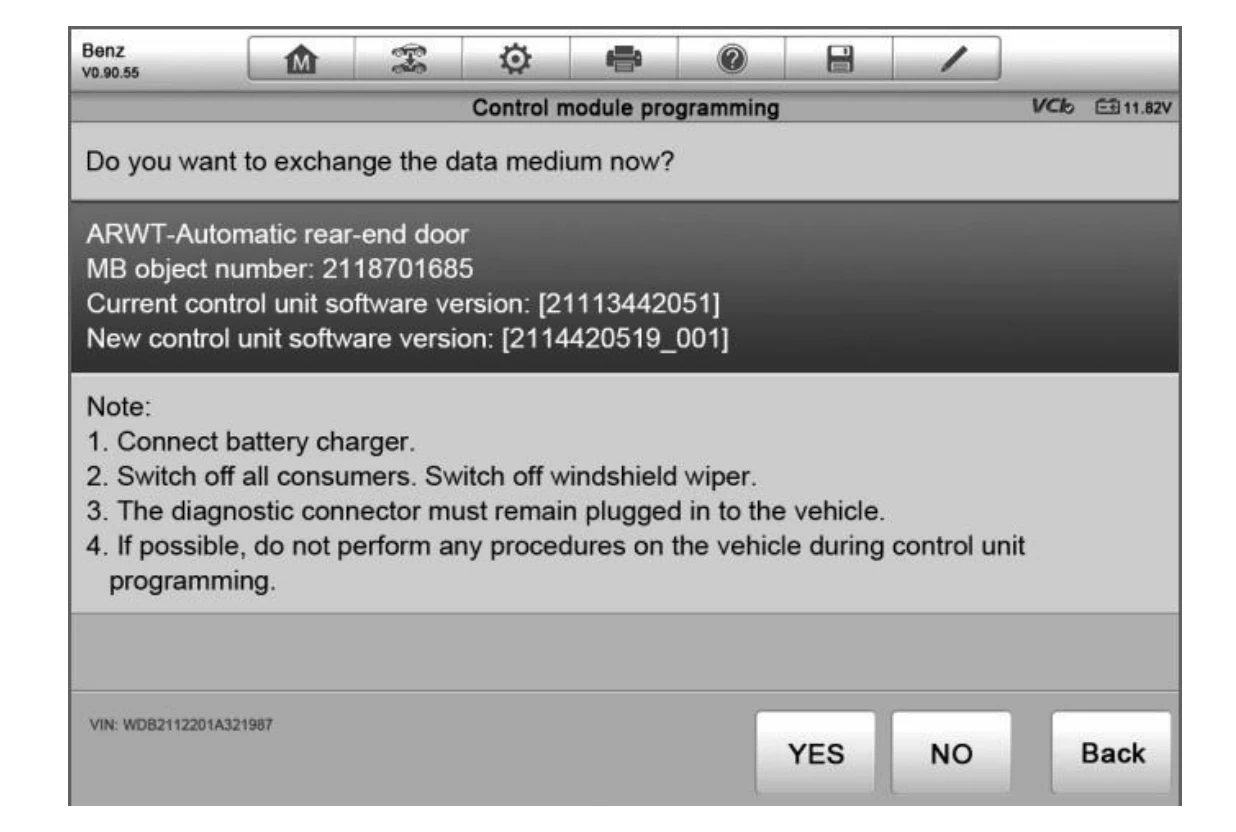
During Programming, diagnostic software or the vehicle manufacturer's programming application communicates with the relevant control unit and carries out the required software-writing or update procedure.
Depending on the vehicle, the process may require:
- the required diagnostic or vehicle-manufacturer software;
- a suitable VCI or Pass-Thru interface;
- access to the manufacturer's server or a software subscription;
- a stable internet connection;
- stable vehicle supply voltage;
- strict adherence to the manufacturer's specified procedure.
In simple terms, Coding mainly determines how the relevant control unit is configured, while Programming changes or updates the software the unit runs.
When may ECU Programming be required?
ECU Programming is not automatically required for every repair or after every electronic component replacement.
It may be required when the relevant manufacturer's repair procedure specifies:
- a control-unit software update;
- installation of a manufacturer-specified software fix or update;
- a software update related to a service bulletin or another technical instruction;
- programming or updating a replacement control unit where required by the manufacturer.
ECU Programming should not be used as an attempt to solve an unexplained problem simply because a newer software version is available for the control unit.
If the cause of the fault is a power-supply, ground, wiring, sensor, actuator or control-unit hardware problem, a software update will not correct that fault.
Programming should be based on the relevant repair procedure, manufacturer technical information or a confirmed software-related issue.
Programming should also not be confused with module initialization, Coding or Adaptation.
Honda documentation illustrates this distinction clearly. Control Module Reprogramming is used to update the software of an existing control unit, while Control Module Initialization is a separate procedure that may be used after module replacement.
The key principle is that control-unit replacement, Programming, Initialization and Coding can be related operations, but they are not automatically the same process.
Adaptation and Relearn - what do these procedures mean?
After certain repairs or electronic component replacements, installing the part may not be enough.
The control system may require an additional procedure to adapt the component, update certain parameters or relearn information required for operation.
In diagnostic software, these operations may be called Adaptation, Relearn, Teach-in, Initialization, Basic Settings, Calibration or other manufacturer-specific names.
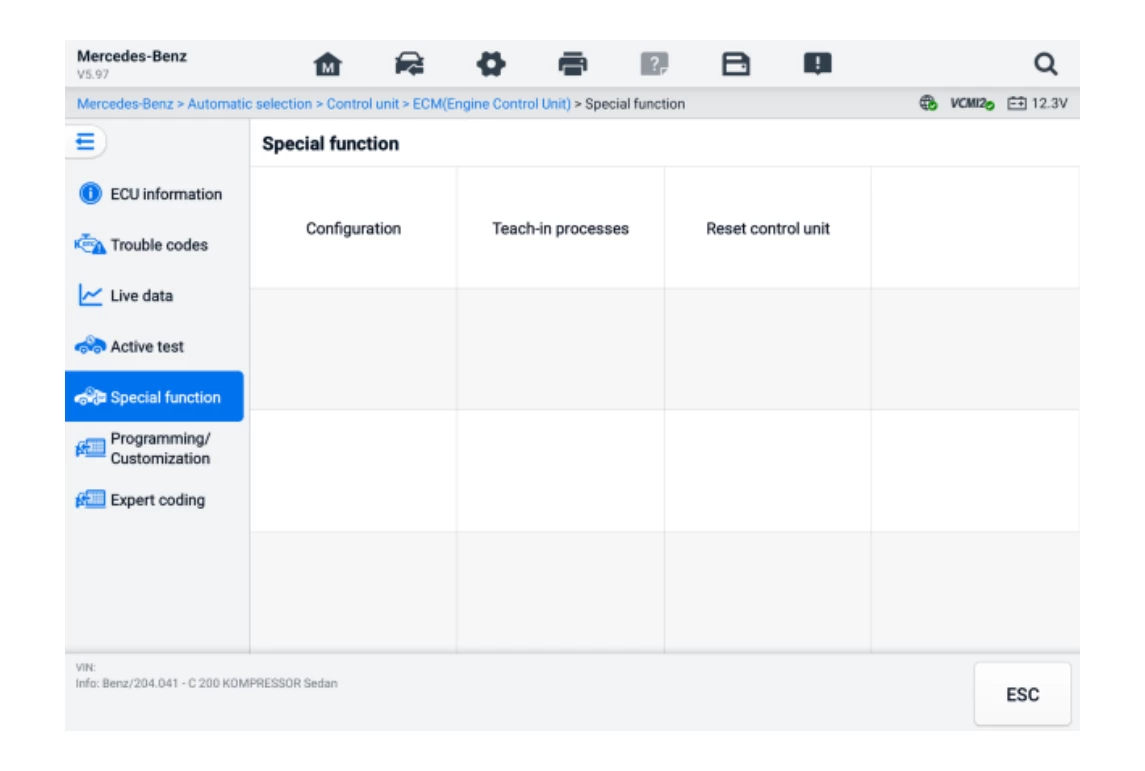
What is Adaptation?
Adaptation is a manufacturer- or diagnostic-system-defined procedure that can be used to adjust certain components or systems after repair, adjustment or replacement.
Depending on the vehicle, an Adaptation procedure may include, for example:
- adapting a component to the control system;
- calibrating specific parameters or positions;
- adjusting system configuration;
- resetting previously stored adaptive values;
- starting a procedure in which new operating values are established.
This does not mean that every Adaptation function performs all of these actions. The actual operation depends on the vehicle, control unit and selected procedure.
The purpose of an Adaptation procedure is generally not to write a new software version to the control unit, but to perform the adjustment, configuration or calibration required by the relevant system.
What is Relearn and why is it not automatically the same as Reset?
A Relearn procedure is used when a vehicle system needs to re-establish, store or relearn information after a change.
Exactly what is relearned depends on the system.
A good example is the TPMS tyre pressure monitoring system. After sensor replacement, some vehicles may require a Relearn procedure so that the system can recognise the sensors. Depending on the vehicle, the procedure may be carried out with a diagnostic tool, through a specified sequence while the vehicle is stationary, or during driving.
Other control systems use different Relearn or Learn procedures, so one example cannot be treated as a universal definition of Relearn for the entire vehicle.
Reset and Relearn should also be distinguished.
A Reset may clear a particular status, memory or stored values. Relearn may then require the system to acquire or learn the necessary information again.
In some repair workflows the two operations may be related, but that does not make Reset and Relearn synonyms.
One repair may require several electronic procedures
Coding, Programming, Adaptation and Relearn are not necessarily independent operations.
One repair may require one of these procedures, several of them, or another manufacturer-defined procedure with a different name.
A good example is replacement of an electronic control unit or another electronically controlled component.
After the physical component has been installed, depending on the vehicle it may be necessary to:
- write or update software;
- configure the component according to the vehicle's equipment;
- perform an Initialization procedure;
- adapt or calibrate specific parameters;
- perform Relearn or another manufacturer-defined learning procedure;
- check fault codes and system operation.
This does not mean that all of these operations are required after every control-unit or component replacement.
A practical approach is:
1. Replace the control unit or component
2. Check the vehicle manufacturer's repair procedure
3. Is software writing or updating required?
4. Is configuration or Coding required?
5. Is an Initialization, Adaptation, Calibration or Relearn procedure required?
6. Check fault status and system operation
A specific vehicle may require only some of these operations, a different sequence, or additional manufacturer-defined steps.
A more precise question than "Does this diagnostic tool support ECU Programming?" is:
Does this diagnostic system support all procedures required for the specific vehicle and repair?
Where does J2534 Pass-Thru fit into the process?
When discussing ECU Programming, the term J2534 Pass-Thru often appears as well.
J2534 is neither a programming method nor an ECU Coding function. It is an SAE standard for a Pass-Thru communication interface between a computer and a vehicle, used in supported control-unit reprogramming workflows.
A simplified J2534 workflow looks like this:
Vehicle-manufacturer software on the computer
J2534 Pass-Thru interface
Vehicle
Control unit
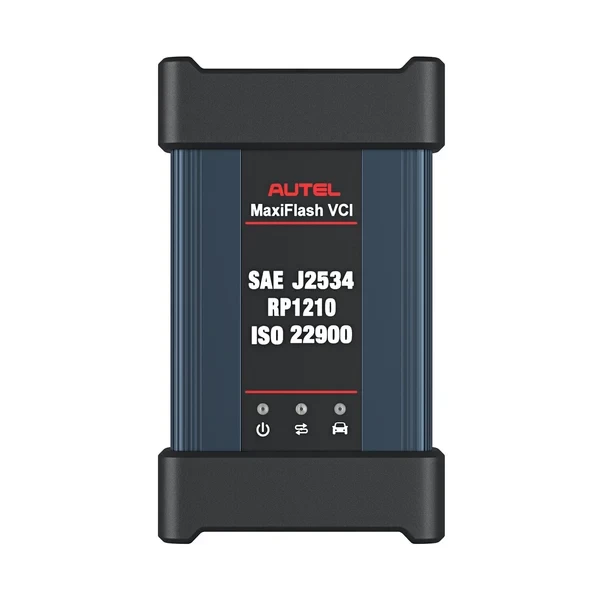
An important distinction is that the J2534 interface itself does not define the programming process.
The vehicle manufacturer provides the programming software and defines the procedure for the relevant control unit, while a J2534-compatible device provides the communication link between that software and the vehicle.
SAE J2534-1 standardises a Pass-Thru interface for reprogramming emission-related control modules. Programming of other modules depends on the vehicle manufacturer's software, the vehicle and the capabilities supported by the interface used.
For this reason, J2534 Pass-Thru listed in a diagnostic tool's specifications does not mean that every control unit on every vehicle can be programmed with it.
You still need to check:
- whether the vehicle manufacturer provides the required programming software;
- whether the specific vehicle and control unit are supported;
- whether the interface supports the required communication;
- whether manufacturer access, a subscription or other authorisation is required;
- which additional steps are required before and after programming.
A J2534 programming environment also does not replace a full diagnostic tool. After Programming, fault-code checks, Coding, Relearn or another diagnostic procedure may still be required.
What should be considered during ECU Programming?
During ECU Programming, software is written to the control unit, so an interruption or unsuitable working conditions can cause the programming procedure to fail.
Stable vehicle supply voltage
One of the most important prerequisites is stable voltage in the vehicle's electrical system.
During Programming, the control unit and other vehicle electronics must receive a stable power supply. If voltage falls below the level required for the vehicle, the programming process may fail.
For this reason, ECU reprogramming procedures often use an external battery maintainer to help keep the voltage stable. The required parameters should be determined according to the specific vehicle manufacturer's requirements.
Stable connection to the diagnostic interface
Communication between the diagnostic system and the vehicle must not be interrupted during Programming.
Depending on the system used, this can mean maintaining a stable connection between:
- the diagnostic tablet or computer;
- the VCI or J2534 Pass-Thru interface;
- the vehicle diagnostic connector;
- the relevant control unit.
During Programming, avoid unnecessarily moving the diagnostic interface, disconnecting cables or carrying out other actions that could interrupt communication.
Internet connection, where required by the system
Some diagnostic and manufacturer systems require an internet connection during Programming.
It may be needed to access the manufacturer's server, check the software version, download required files or authorise a particular operation.
Not every programming procedure works in the same way, so internet requirements should be confirmed for the tool and programming workflow being used.
Do not interrupt the programming process
Once Programming has started, follow the diagnostic software and vehicle manufacturer's instructions until the process is complete.
Do not:
- switch the ignition off unless instructed by the software;
- close the programming application;
- disconnect the diagnostic interface;
- disconnect vehicle power;
- ignore procedure instructions shown on the screen.
A failed programming procedure does not automatically mean that the ECU is permanently damaged. In some cases, the procedure can be repeated or recovered, but this depends on the control unit and the type of failure.
In general, the basic principle during Programming is simple: stable voltage, stable communication and precise compliance with the vehicle manufacturer's procedure.
How can you check whether a diagnostic tool supports the function you need?
Diagnostic tool specifications often list terms such as ECU Coding, ECU Programming, Online Coding, Adaptation or J2534 Pass-Thru.
These terms provide a useful indication of the tool's capabilities, but the wording alone is not enough to determine whether a particular procedure will be available on a given vehicle.
A more reliable way to verify support is to check the following:
Vehicle make and model
A diagnostic tool may support a wide range of makes, while certain Coding or Programming functions may only be available on some models.Model year and vehicle generation
Different generations of the same model can have different electronic architectures, control units and diagnostic procedures.The specific control unit
It is not enough to know that the tool supports the vehicle. You also need to check the control unit in question and the exact operation you need to perform.The required procedure
Determine whether the job requires Coding, Programming, Initialization, Adaptation, Relearn, Calibration or another manufacturer-defined function.Diagnostic tool model and software version
Different diagnostic tools from the same manufacturer may support different functions. Support can also change with software updates.Additional access, licences and Security Gateway
Some functions may require an active software subscription, a vehicle-manufacturer account, security authorisation or access to an online service.Newer vehicles may also use protected diagnostic access, commonly referred to as a Security Gateway.
Even when the diagnostic tool supports the function itself, Coding, Adaptation or other protected operations may still require manufacturer authorisation, an additional account or activation.
Function support and access to the function are not always the same thing.Additional interface or OEM software
Some ECU Programming workflows require a J2534 Pass-Thru interface and vehicle-manufacturer software running on a computer. In other cases, Programming is performed directly within the diagnostic-tool environment.
A much more precise question than:
"Does this diagnostic tool have ECU Coding?"
is:
"Does this tool support the required function on the specific vehicle, control unit and repair procedure?"
When checking a diagnostic tool for a specific job, have the vehicle make, model, model year, control unit and required procedure ready so that support can be verified before purchase.
If the aim is to choose a professional diagnostic tool for general workshop use, you should also evaluate vehicle coverage, Live Data, Active Test, service functions, communication protocols, licences and other capabilities.
For a broader diagnostic-tool selection process, see the BalticDiag guide How to Choose a Diagnostic Tool for an Auto Workshop.
Diagnostic tools with ECU Coding and Programming capabilities
If a workshop needs advanced ECU Coding or Programming in addition to standard diagnostics, it should consider advanced professional diagnostic systems.
One example is AUTEL MaxiSys Ultra S2, a professional diagnostic system that provides advanced ECU Coding and Programming capabilities on supported vehicles.
In the LAUNCH range, one example is LAUNCH X-431 EURO TAB III. Its included SmartLink C supports J2534 Pass-Thru, which can be used with compatible vehicle-manufacturer programming software.
Note: ECU Coding and Programming availability depends on the specific vehicle, control unit, software and required procedure. Support for the required function should be verified before purchasing the tool.
If you are choosing between AUTEL and LAUNCH professional diagnostic platforms, see our AUTEL vs LAUNCH diagnostic tools comparison for automotive workshops for a broader comparison of ECU Coding and Programming capabilities, VCI, J2534, CAN FD, DoIP, software costs and models from different diagnostic levels.
Common misconceptions about ECU Coding and Programming
| Assumption | More accurate explanation |
|---|---|
| ECU Coding only means activating hidden functions. | No. Configuring comfort or equipment functions is only one possible use of Coding. |
| If a diagnostic tool supports ECU Programming, it can program any ECU. | No. Support depends on the vehicle, control unit, software and the specific Programming method. |
| Reset and Relearn are the same thing. | Not always. Reset may clear a status or stored values, while Relearn may be a separate relearning procedure. |
| ECU Programming is the same as chip tuning. | No. In repair and diagnostic workflows, ECU reprogramming may mean writing or updating manufacturer-provided software. Chip tuning has a different purpose. |
| Active Test is a Coding function. | No. Active Test checks how a system responds to a command, while Coding changes or adjusts configuration. |
Frequently asked questions
Are ECU Coding and ECU Programming the same thing?
No. ECU Coding is generally associated with adjusting control-unit configuration or specific parameters, while ECU Programming or Reprogramming usually means writing or updating software in the control unit.
Is Programming always required after ECU replacement?
No. It depends on the specific vehicle, control unit and manufacturer repair procedure.
After module replacement, Programming, Coding, Initialization, Adaptation, Relearn or a combination of several procedures may be required.
Are Adaptation and Relearn the same thing?
Not necessarily.
Adaptation may involve adjusting, configuring or calibrating a component or system. Relearn usually refers to a specific procedure in which a system relearns required information.
Can a diagnostic tool with ECU Coding also program an ECU?
Not necessarily.
Coding and Programming are separate capabilities. A tool may provide extensive Coding functions while not supporting the specific ECU Programming procedure you need.
Does J2534 mean any vehicle can be programmed?
No.
J2534 Pass-Thru provides the communication interface between programming software running on a computer and the vehicle. Support for specific vehicles and control units depends on the manufacturer's software, the interface used and the particular programming procedure.
Need a diagnostic tool with ECU Coding or Programming?
When choosing a diagnostic tool, it is not enough to see ECU Coding or ECU Programming listed in the product specification. Check whether the tool supports the function you need for the relevant vehicle make, model, model year and control unit.
Browse BalticDiag professional vehicle diagnostic equipment or contact us if you need help checking support for a particular Coding, Programming, Adaptation or Relearn procedure.
View car diagnostic equipment